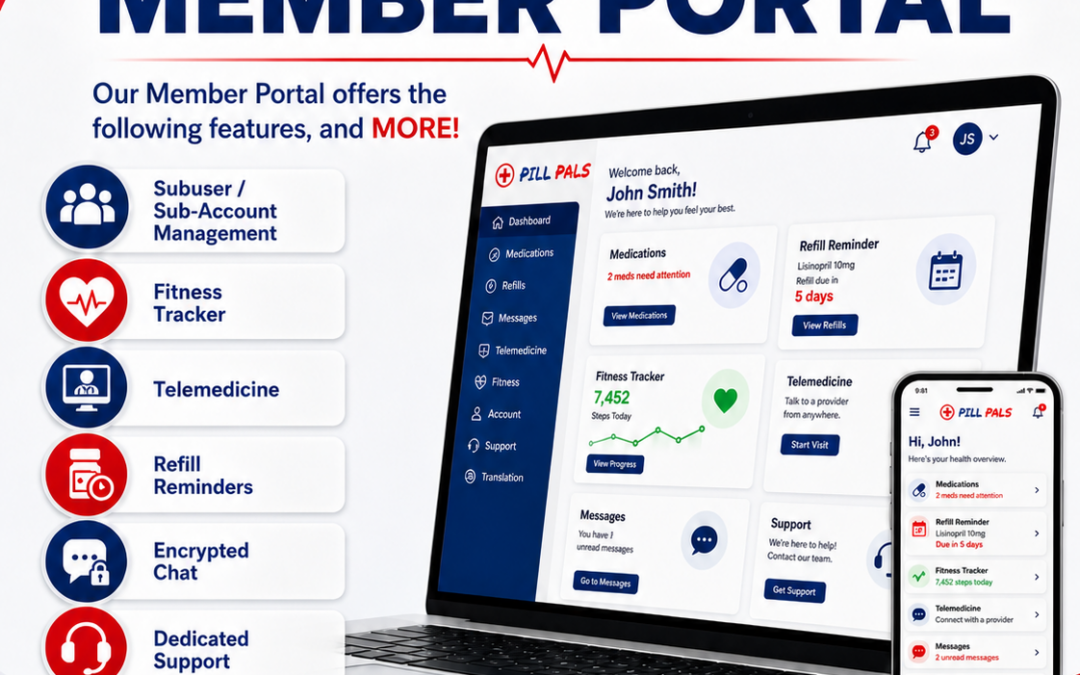

The redesigned Pill Pals Dashboard brings several important patient tools into a more organized account experience, including Pill Pass information, forms and notices, refill access, order tools, and support resources. This guide explains how patients can think about the new dashboard and why it matters.
Patients often use their pharmacy account for more than one reason. One patient may be looking for the Pill Pass drug list. Another may be checking whether a refill is due. Another may need a form, an account setting, a message, or an order update. The redesigned dashboard helps create a clearer place to begin.
Pill Pass Information in the Dashboard Experience
Pill Pass is an important part of the Pill Pals membership experience. Many patients visit Pill Pals because they are looking for cost-effective pharmacy options and simple pricing. By making Pill Pass-related resources easier to find from the dashboard experience, Pill Pals can help patients better understand available savings opportunities and pharmacy programs.
Patients should use the dashboard as a starting point to learn more about available account tools and membership resources. Pill Pass availability, pricing, prescription requirements, and medication access may depend on the specific medication, account status, pharmacy review, and applicable laws. Patients should contact Pill Pals if they have questions about a specific product or prescription.
Forms and Notices
Forms and notices are sometimes overlooked, but they can be very important. Patients may need to review pharmacy notices, access required forms, or find patient information resources. The redesigned dashboard makes these types of resources easier to locate so patients do not have to search through unrelated pages.
A clear forms and notices area can help patients stay organized. It can also help patients understand what information may be needed for pharmacy services. When forms are easier to find, patients may be able to complete the necessary steps faster and reduce delays.
Refill and Reorder Tools
Refill tools are among the most useful patient portal features. The redesigned dashboard gives patients a more visible place to start when they need to request a refill, reorder an eligible item, or find instructions for the next step. This can be especially helpful for patients who manage maintenance medications or use home delivery pharmacy services.
Some refills may require prescriber authorization, updated information, or pharmacy review before they can be dispensed. The dashboard is intended to help patients find the appropriate path, but it does not guarantee that a medication can be refilled automatically. Patients should follow pharmacy instructions and contact Pill Pals with questions.
Order Tracking and Shipment Awareness
Patients who receive medications by mail often want clear order information. The redesigned dashboard helps patients locate order and tracking resources more easily. This can reduce confusion after an order is placed and help patients understand where to look for updates.
Tracking details may depend on the shipping method, processing status, and available order information. If a patient does not see what they need, the dashboard can also help point them toward support resources.
Account Tools and Support
The dashboard also supports account management. Patients may need to review profile information, update settings, find messages, or contact support. By placing account tools in a more organized layout, Pill Pals helps patients keep their information current and find help when needed.
Patients can read more about support and account tools in Built Around Patients: How the New Pill Pals Member Dashboard Makes Pharmacy Access Easier. For a full redesign overview, visit A New Patient Portal Experience: Introducing the Redesigned Pill Pals Member Dashboard. For a patient-friendly explanation of refills, orders, and messages, read Refills, Orders, and Pharmacy Messages: What Patients Can Do Inside the New Member Dashboard.
Using the Dashboard With Confidence
The redesigned Pill Pals Dashboard is meant to help patients feel more confident when managing pharmacy tasks online. It organizes key features in a way that is easier to scan, easier to understand, and easier to use. Patients can log in, review available tools, and take the next step based on their needs.
Patients should remember that online tools are designed to support pharmacy communication and account access. They do not replace professional medical advice, pharmacist counseling, prescriber instructions, or emergency care. Patients should call 9-1-1 for emergencies and contact Pill Pals directly for account-specific questions.
Patients interested in wellness tracking can also read New Fitness Tracker in the Pill Pals Patient Portal Helps Members Log Calories, Weight, and Health Progress, a Membership Spotlight Newsletter article about logging calories, tracking weight, storing wellness information, and printing reports from the Patient Portal.
Please login to your Pill Pals Account at https://pillpals.co/my-account/
Use your Member Dashboard to review available account tools, pharmacy messages, refill options, order information, and other patient portal features.
Pill Pals Pharmacy provides Pharmacy services at cost effective prices with zero administrative fees. Reach out today to learn more by emailing [email protected]